Streaming vs. Torrenting: A 2026 Cost-Benefit Analysis
Last updated: February 2026 | Real cost breakdowns, quality comparisons, and an honest look at where each option wins and loses
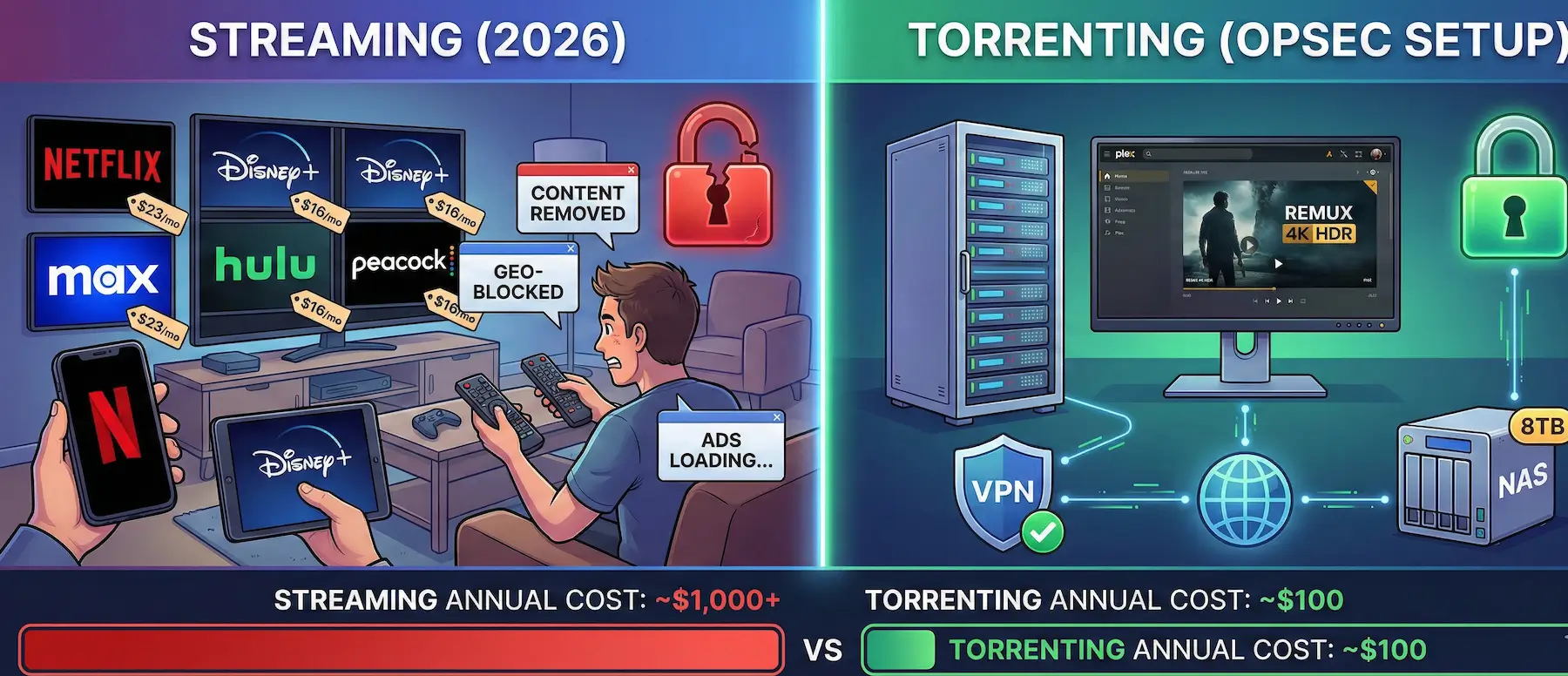
The average US household now pays for 4.5 streaming subscriptions. Netflix raised prices again. Disney+ defaulted everyone to the ad tier unless you pay premium. HBO Max rotates content out with no warning. You started watching a show on Hulu, and season 4 moved to Peacock. You’re spending $60/month and still can’t find the thing you want to watch.
Meanwhile, a VPN costs $3/month on an annual plan.

This isn’t a “torrenting is always better” argument — streaming wins in several areas and we’ll cover those. But the 2026 streaming landscape has shifted the math significantly. Between subscription fatigue, quality compression, regional licensing walls, and the slow death of password sharing, more people are re-evaluating what they’re actually paying for. If you’re one of them, here’s the breakdown with real numbers.
For either path, protect yourself. A P2P-capable VPN like ProtonVPN handles both — it unblocks geo-restricted streaming libraries and encrypts torrent traffic. One subscription, both use cases covered.
The 2026 Streaming Landscape
Streaming in 2026 isn’t what it was in 2019, when Netflix had most of what you wanted and cost $13/month. Every studio launched its own platform, pulled its content from competitors, and now you need four or five subscriptions to cover what one used to handle.
Content fragmentation is the core problem. A show starts on Netflix, gets picked up by another platform for later seasons, or disappears entirely when licensing deals expire. Films rotate between services monthly. The catalog you’re paying for today isn’t the catalog you’ll have next month. There’s no guarantee that the movie you added to your watchlist last week will still be there when you sit down to watch it.
Ad-supported tiers are the new default on most platforms. Disney+, Netflix, Hulu, Peacock, and Max all push ad-tier pricing as the “standard” plan, with ad-free viewing costing $5–8 more per month per service. The premium experience that used to be the baseline now costs extra everywhere.
Password sharing crackdowns finished rolling out across major platforms in 2024–2025. Netflix’s enforcement alone pushed an estimated 15–20 million users into either paying for their own accounts or dropping the service. Households that previously split a single account across family members now each carry the full cost.
Regional licensing remains the most frustrating part of legal streaming. A film available on Netflix US might be on Disney+ in the UK, unavailable entirely in Germany, and on a platform you’ve never heard of in Southeast Asia. You’re paying for a service, and the content library you receive depends entirely on where you live. VPNs can bypass this — and it’s one of the reasons a VPN subscription has value beyond torrenting.
The Cost Comparison
| Service | Monthly Cost (US, ad-free, 2026) |
|---|---|
| Netflix Premium (4K) | ~$23 |
| Disney+ Premium | ~$16 |
| Max (ad-free) | ~$17 |
| Hulu (no ads) | ~$18 |
| Peacock Premium Plus | ~$12 |
| Total | ~$86/month |
| Torrenting Setup | Monthly Cost |
|---|---|
| VPN (ProtonVPN Plus, annual) | ~$5/month |
| Storage (8TB external drive, amortized over 3 years) | ~$3/month |
| Total | ~$8/month |
Over a year, the gap is roughly $1,032 vs. $96 — assuming you subscribe to five major streaming services at ad-free tiers. Most people don’t subscribe to all five simultaneously, so a realistic household might spend $40–55/month on 3–4 services. That’s still $480–660/year vs. under $100.
The cost argument alone doesn’t settle the question. Convenience, quality, legality, and content availability all factor in.
Quality: Streaming’s Biggest Weakness
This is where torrenting pulls ahead by a wide margin, and it’s the factor most comparison articles skip entirely.
Streaming services compress everything. They have to — they’re delivering video to millions of concurrent viewers and bandwidth costs money. Netflix’s 4K stream runs at roughly 15–18 Mbps. A Blu-ray remux of the same film — an untouched copy of the disc data — runs at 50–80 Mbps. That’s 3–5x the bitrate, and you can see the difference. Dark scenes, fast motion, fine grain — compression artifacts that streaming smooths away are preserved in a remux.
Audio follows the same pattern. Streaming platforms typically deliver Dolby Digital Plus (lossy, compressed) at 640–768 kbps. A Blu-ray remux carries Dolby TrueHD or DTS-HD Master Audio — lossless audio at bitrates of 3,000–6,000 kbps. If you have a decent sound system or headphones, the difference between lossy streaming audio and lossless disc audio is not subtle.
4K HDR content adds another layer. Streaming 4K requires the premium tier on every platform — Netflix charges $23/month for it. Torrented 4K HDR files come in HDR10, HDR10+, and Dolby Vision flavors, often with better color grading preservation than their streaming equivalents because they aren’t re-compressed for delivery.
Subtitles are the overlooked advantage. Streaming services give you whatever subtitle tracks they’ve licensed — usually just a handful of languages, sometimes with poor timing. A well-uploaded torrent includes every subtitle track from the disc (PGS image-based subs), plus community SRT files in dozens of languages. For multilingual households, this matters.
The quality comparison table:
| Factor | Streaming (4K Premium Tier) | Torrenting (Blu-ray Remux) |
|---|---|---|
| Video bitrate | 15–18 Mbps | 50–80 Mbps |
| Audio | Dolby Digital Plus (lossy) | TrueHD / DTS-HD MA (lossless) |
| HDR | HDR10 (usually), some DV | HDR10, HDR10+, Dolby Vision |
| Subtitle options | 5–15 languages | 20–40+ languages, multiple formats |
| Resolution | Up to 4K (tier-dependent) | Up to 4K (always full quality) |
| Compression artifacts | Visible in dark/fast scenes | None (disc-identical) |
Convenience: Streaming’s Biggest Strength
Streaming wins on convenience and it’s not close — for casual viewing.
Open the app, press play, it works. Content syncs across your phone, tablet, TV, and laptop. Recommendations surface new shows. No file management, no storage, no setup. For someone who watches a couple of shows a week and doesn’t care about bitrate, streaming is frictionless.
Torrenting requires setup. You need a torrent client, a VPN configured correctly (see the Anonymous Torrenting Guide for the full stack), storage space, and a basic understanding of file formats. For a single file, the process is: search → download → play. Not hard, but not “press play” either.
Where that convenience gap narrows dramatically is automation. Sonarr (for TV) and Radarr (for movies) monitor for new releases, send download requests to your torrent client through Prowlarr (which handles indexer management), and when the download finishes, the file gets renamed and moved into your media library folder. Plex or Jellyfin picks it up automatically, matches metadata and artwork, and serves it to every device in your house — and remotely, if you configure access.
Once that pipeline is set up, the experience is functionally identical to streaming: open the Plex app on your TV, browse your library, press play. The difference is you own the files, the quality is better, and nothing disappears because a licensing deal expired. The Torrent Search Blueprint covers the Prowlarr/Jackett setup that makes this automation work.
The trade-off is upfront effort. Setting up Sonarr/Radarr/Prowlarr/Plex takes an afternoon. Maintaining it takes occasional attention. If you’re not willing to invest that time, streaming is the easier path.
Content Availability
Streaming loses here, and the gap is widening.
Geo-blocking is the obvious problem. A film available in the US Netflix library might not exist in your country’s catalog. Regional licensing agreements mean that the service you pay for delivers a different library depending on where you live. VPNs can bypass geo-restrictions for streaming — ProtonVPN works with Netflix, Disney+, and most major platforms on its Plus plan — but the platforms actively fight VPN detection, so it’s a cat-and-mouse game.
Content removal is the less obvious problem. Streaming libraries aren’t permanent. Shows and movies rotate in and out based on licensing windows. A film you watched last month might be gone today, moved to a competitor’s platform, or pulled into a “vault” with no return date. In 2025 alone, HBO Max removed dozens of original productions — content they funded and produced themselves — for tax write-off purposes. If the platform that made the content will remove it for accounting reasons, nothing in your streaming library is safe.
Back catalogs are thin. Streaming platforms optimize for new releases and trending content. Older films, foreign cinema, niche documentaries, and complete TV runs (every season, not just the “popular” ones) are inconsistently available. A specific film from 1987 might not be on any streaming platform in your region.
Torrenting doesn’t have these problems. If content exists digitally and someone has uploaded it, it’s available. No geo-restrictions, no removal, no licensing windows. The Torrent Search Blueprint covers where to find content across public indexers, meta-search engines, and DHT crawlers. Between TorrentGalaxy, 1337x, and specialized trackers, the combined catalog dwarfs any single streaming service.
Legal and Privacy Comparison
Streaming is legal. Torrenting copyrighted content without authorization is not — that’s the reality, and no guide should pretend otherwise.
But the privacy comparison is more nuanced than “legal = safe.”
Streaming platforms collect extensive data: what you watch, when, how long, what you pause, what you skip, what you search for, your device fingerprints, your IP address, and your payment information. This data is used for recommendation algorithms, sold to advertising partners (especially on ad-supported tiers), and subject to law enforcement requests. Your viewing habits are a detailed behavioral profile tied to your real identity.
Torrenting with proper OPSEC — VPN with a kill switch, interface binding, no DNS leaks — exposes far less personal data. Peers in the swarm see a VPN IP address. Your ISP sees encrypted traffic to a VPN server. The VPN provider sees connection timestamps (if they log, which no-log providers like ProtonVPN and Mullvad claim not to). Nobody has a behavioral profile of your viewing habits.
The legal risk of torrenting is real but manageable with a VPN. Copyright enforcement firms like Maverickeye and Guardaley monitor public swarms and log IP addresses. Without a VPN, your ISP IP is in that log, and the troll sends a settlement letter. With a VPN, they log the VPN’s IP, which leads nowhere. The VPN for Torrenting Survival Guide covers exactly how this troll pipeline works and how to break it.
Neither option is zero-risk. Streaming trades privacy for legality. Torrenting trades legality for privacy (when done correctly). Pick your trade-off with open eyes.
The Hybrid Approach
Most people who think about this seriously end up in the same place: use both.
Stream mainstream content where convenience matters — the show everyone’s talking about this week, casual background viewing, content you’ll watch once and forget. If you’re already paying for one or two streaming subscriptions, use them for what they do well.
Torrent niche, unavailable, or quality-critical content — the film that’s not on any platform in your region, the show that got pulled, the movie you want in proper 4K HDR with lossless audio instead of a compressed stream, the complete run of a series where streaming only has seasons 2–4.
Build a local library for content you care about. A Plex media server or Jellyfin instance on a NAS, old PC, or even a Raspberry Pi 4 (for direct play) gives you a personal streaming service with no subscription fees, no content removal, and no compression. Pair it with Sonarr/Radarr for automation and you have the best of both worlds — streaming convenience with torrent quality. Hardware requirements are modest: any modern Intel CPU with Quick Sync handles transcoding, and storage is cheap (8TB drives run $120–150).
Set Up
The practical workflow looks like this: Sonarr monitors for new episodes of shows you follow, sends search requests through Prowlarr to your configured indexers (both public and private tracker APIs if you have them), passes matching results to qBittorrent for download, and when the file completes, moves it into your Plex/Jellyfin library folder with proper naming. Plex picks it up on its next scan, matches metadata and artwork from TMDB/TVDB, and it’s ready to watch on any device. You open the Plex app on your TV and the new episode is just there — no manual steps after initial setup.
For anyone going the torrent route — even partially — the VPN setup is non-negotiable. The Anonymous Torrenting Guide covers the full six-layer OPSEC stack. Start there.
Storage: The Hidden Cost of Torrenting
Streaming has no storage cost — that’s the platform’s problem. Torrenting puts storage on you, and the costs depend on quality.
A 1080p encode of a two-hour movie runs 4–8 GB. A Blu-ray remux of the same film runs 30–60 GB. A 4K remux with lossless audio can hit 60–80 GB. A full season of a TV show in 1080p: 15–40 GB. In 4K remux: 200–500 GB.
For casual downloading, a 4TB external USB drive ($80–100) lasts a while. For a serious media library, a NAS (Synology DS224+ or similar, ~$300 for the unit plus drives) gives you redundancy, network access, and room to grow. A two-bay NAS with mirrored 8TB drives gives you 8TB of usable space with protection against a single drive failure — important when you’ve spent months building a curated library. Budget for storage the way you’d budget for a streaming subscription — it’s an ongoing cost as your library grows, though the per-month amortized cost is still far below what streaming services charge.
The upside is permanence. Files you download don’t expire, don’t get removed, and don’t require a monthly payment to access. Your library is yours.
Frequently Asked Questions
Is streaming quality really that much worse than torrenting?
For casual viewing on a phone or laptop, you probably won’t notice. On a 55″+ 4K TV with a soundbar or proper speakers, the difference between a 15 Mbps Netflix stream and a 60 Mbps Blu-ray remux is visible — especially in dark scenes, fast action, and fine detail. Audio is where the gap is most obvious with any decent setup.
Can I use a VPN for both streaming and torrenting?
Yes. ProtonVPN’s Plus plan unblocks major streaming platforms (Netflix, Disney+, BBC iPlayer) and supports P2P on designated servers. Connect to a streaming-optimized server for Netflix, switch to a P2P server for torrenting. Mullvad works for torrenting but doesn’t prioritize streaming unblocking — it’s a privacy-first tool, not a geo-bypass tool.
Is it worth setting up Sonarr/Radarr/Plex?
If you torrent regularly, absolutely. The initial setup takes an afternoon, but once it’s running, new episodes download automatically, get renamed, and appear in your Plex library without you touching anything. It turns torrenting from a manual process into a streaming-like experience. The Torrent Search Blueprint covers the Prowlarr integration that ties it together.
What about legal risks?
Streaming is legal. Torrenting copyrighted content carries legal risk that varies by country. In the US and EU, copyright enforcement firms monitor public torrent swarms and send settlement letters to ISPs, who forward them to subscribers. A VPN prevents your real IP from appearing in these logs. The risk with a properly configured VPN is very low — but it’s not zero, and no one should tell you otherwise.
How much storage do I actually need?
Depends on quality. If you download 1080p encodes, a 4TB drive holds 500+ films. If you want 4K remuxes, the same drive holds 50–70. Most people land somewhere in between — remuxes for films they care about, smaller encodes for everything else. A NAS with expandable storage is the long-term play.
The initial download uses more bandwidth than streaming the same content, because you’re downloading a higher-quality file. But you download once and can rewatch without using any additional bandwidth.
Streaming re-downloads the content every time you press play. Over multiple viewings, torrenting actually uses less total bandwidth.
Ready to set up your VPN for torrenting? Start with the Anonymous Torrenting Guide — it covers interface binding, DNS leak protection, and the full OPSEC stack. For finding content, the Torrent Search Blueprint covers every major indexer, meta-search tool, and automation setup.